SlaveTats - RaceMenu steps
The steps are very mechanical. If you have any doubts, read the terminal below, it will always have tips and comments to guide you. I even used different colors to make it easier to follow.
First step - automatic psc papyrus creation
Using the Program to Generate the PSC File
Start the program and keep the first tab, 'SlaveTats - RaceMenu', open. Navigate to the directory of the tattoo mod you wish to convert. Inside that mod's folder, locate the following path: (Mod name)\textures\actors\character\slavetats You will find a JSON file in this directory. Drag and drop this file into the program window. A preview of the Papyrus (PSC) script will be automatically displayed. Click the Generate .psc File button to generate the script file.
Organizing Textures and Files for the Next Step
Once the folder containing the newly created PSC file opens, you can close it. Proceed by clicking the create organized texture folder button. This action will copy the mod's textures into a new, organized folder structure required for the new mod. Finally, move the two newly created folders into your mod's main directory, as demonstrated in the accompanying video. This completes the first step. The next stage is to convert the PSC file into a PEX file.
Second Step - Easily Compile PSC to PEX
Now that your PSC file is ready, the next step is to compile it into PEX format. While there are several methods to do this, such as using the official Creation Kit, direct command-line compilation, or a setup in Visual Studio Code, the method I use most frequently for its speed and efficiency is the PCA SE compiler. To make this even simpler, I've created a guided process within the tool.
Guided Compilation Steps
As shown in the video, navigate to the (Mod name)\scripts\Source directory to find your PSC file. In our conversion tool, go to the PCA Papyrus Compiler Helper tab.
- Click the gear icon and select "Emulate MO2" to generate a path, which you must copy, IT IS NOT NECESSARY TO HAVE MO2, THIS EMULATES EVERYTHING NEEDED TO COMPILE OVERLAY.
- Open the PCA program and paste the copied path into its MO2 configuration section.
- Return to our tool, press the green button, and drag your PSC file into the window.
- Finally, drag the same PSC file into the PCA program to compile it.
Upon completion, the compiled PEX file will be automatically placed in the correct directory.
Third Step - Create the ESP/ESPFE with SSEEdit
Launching SSEEdit for the Final Step
The final piece is the plugin file (.esp). While this is typically done via the Creation Kit, I've developed a streamlined process using SSEEdit.
- Open SSEEdit through your mod manager (e.g., MO2). When prompted, select only the
Example for creating racemenu overlays John95.espfile and wait for it to load. - As shown in the video, right-click the template mod, choose "Apply Script," and select
0002 RaceMenu Overlays ESP Creator.pas. - A dialog will appear. You can create a new ESP, or an ESP flagged as an ESPFE (recommended).You will be prompted for a mod name and then the PEX file name. Enter your desired names.
- Navigate into your new plugin to the "Quest" section and manually edit the "FormID" field to match the new quest's ID, as shown in the video.
- Finally, run "Clean Masters" on your plugin, then close SSEEdit and save.
Cleanup and Organization (Optional) - This final step is recommended to save space and keep your mod tidy.
- Move the new ESP file you just saved into your main mod folder.
- Since the mod is now a RaceMenu overlay, you can delete the now-unused SlaveTats texture folder, located at
(Mod name) extures\actors\character\slavetats.
That's it! For even greater space savings, you can compress the files, as shown in the video, which can shrink an 800MB mod down to 60MB without quality loss.
RaceMenu - SlaveTats steps
Simple Conversion Process
This is simpler than the previous one and there's only one step. You just need to go to the (Mod name)\scripts\Source folder and find the PSC file, drag it into the program and it will be ready automatically. Then press the second green button, Created mod folder, and that's it. The basic structure will be created. After that, just drag everything to where it should be and remove the old RaceMenu overlay traces, and you'll have the mod converted to RaceMenu.
The steps are very mechanical. If you have any doubts, read the terminal below; it will always have tips and comments to guide you. I even used different colors to make it easier to follow.
RaceMenu - SlaveTats from scratch
Convert a set of DDS files into a complete mod
This is simpler. My program has specific tabs: one for converting from RaceMenu to SlaveTats and another for the reverse conversion. You just need to drag the folder containing the DDS files you want to convert. The complete list of DDS files will appear.
Double-clicking on a DDS file name will allow you to preview it. You will have body textures and backgrounds for comparison, such as CBBE and UBE. To start, you can begin with a folder of DDS files. If you wish to perform maintenance or add more content to your mods, simply drag the corresponding JSON or PSC file to the creator.
Read the instructions carefully. The terminal is your friend; I spent a lot of time adding comments for different scenarios and, especially, the backup system. This prevents you from losing your configurations. It's like a large playground that avoids the need to write code manually.
I will leave a video for you to analyze how to create mods in both formats. Only DDS files are needed.
Configuration and Recommendation
Papyrus Compiler App PCA
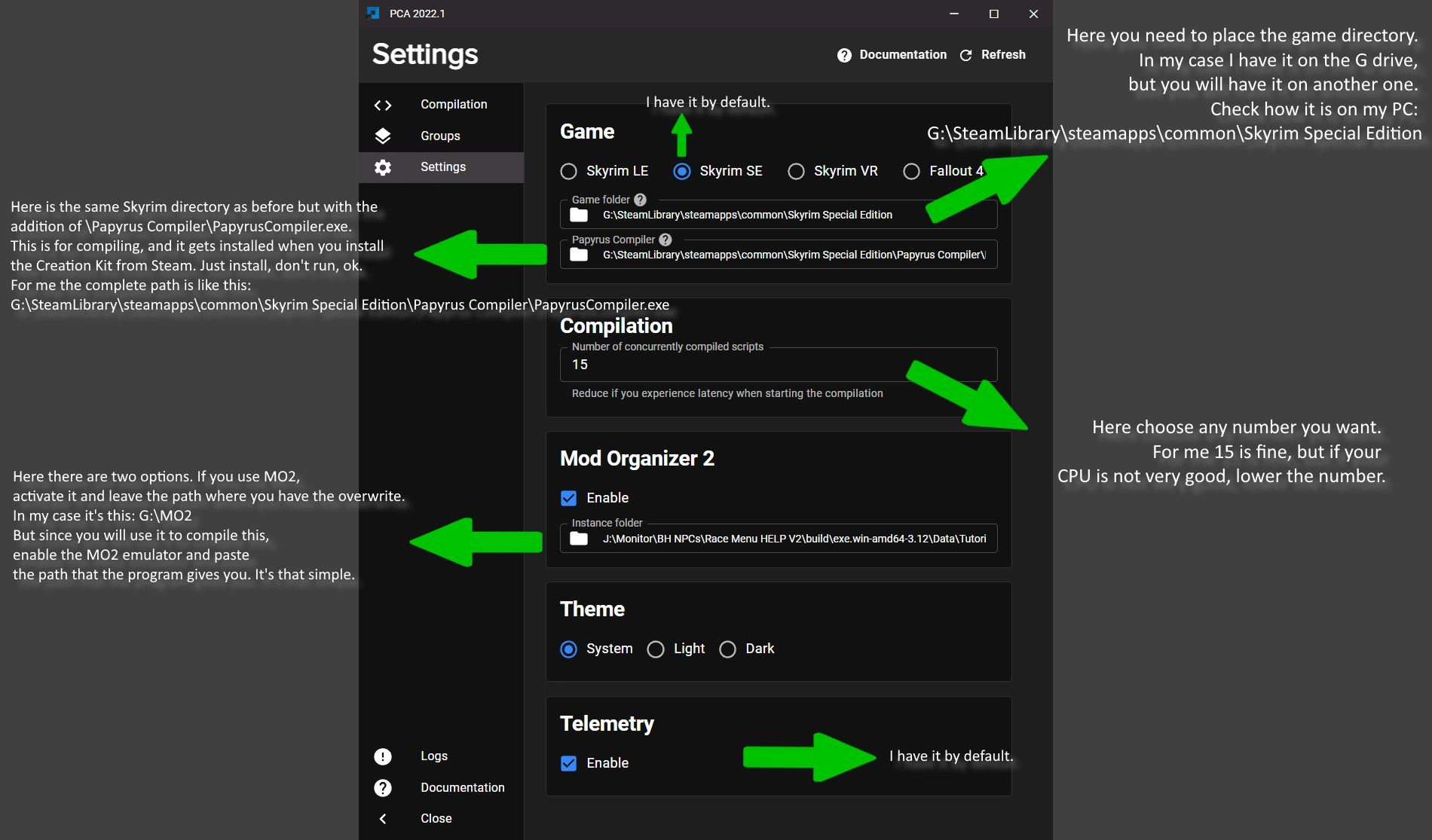
This tool has its own wiki at https://pca.kiyozz.com/ and it's one of the reasons i decided to learn how to create web pages for my projects, although i decided on a different design. the important thing is that once downloaded from the nexus page, you install it wherever you want, and in the configuration tab make sure to follow these hints. it cost me a lot to learn this on my own before. this app is very practical but not very intuitive hahaha, but i love it.
Compress mod to save space without losing quality
Texture mods often weigh too much, especially tattoo mods that aren't always running. This trick works very well for SSD or NVMe drives, but if your disk is an HDD, I don't recommend it.
Look, go to the mod in question, select one or multiple, and apply in Properties → Advanced settings → Compress to save disk space. Then accept and wait for the file to compress, just like in the video. Done: you'll go from 10 GB of mods to just 700 MB.
There's also the option of using Cathedral to reduce DDS quality, but it can lose quality, so I prefer this method.
System Architecture
Input
JSON, PSC or DDS
PyQt5
Graphical Interface
Processing
Conversion & Analysis
Output
Packaged Mod
Data Flow
The tool reads input files (JSON/PSC/DDS), processes them through the PyQt5 interface, performs the necessary conversions while preserving data integrity, and generates the output with the appropriate mod structure and automatic packaging.
Main Tools
SlaveTats → RaceMenu
Drag a JSON to generate a Papyrus PSC script. Creates organized texture folders and packages the mod.
- JSON to PSC
- Organized Textures
- Mod Package (ZIP/7z)
RaceMenu → SlaveTats
Drag a PSC file to extract data into a JSON file. Creates mod folders and packages the result.
- PSC to JSON
- Structure Creation
- Automatic Cleanup
SlaveTats Creator
Create a SlaveTats mod from a folder of DDS textures. Features an editable table and backup management.
- DDS to JSON
- Editable Grid
- Backup/Restore
RaceMenu Creator
Create a RaceMenu mod from a folder of DDS textures. Supports loading existing PSC scripts for editing.
- DDS to PSC
- Editable Grid
- Load Existing Scripts
Papyrus Compile Helper
Assists with Papyrus compilation for MO2 or standalone. Automates file copying, moving, and cleaning.
- MO2 Integration
- Standalone Emulator
- Automated Workflow
Tips & Resources
Displays motivational tips and cute cat images for quick breaks. Includes links to online documentation.
- Modding Tips
- Cat GIFs!
- Online Docs
Acknowledgments
Reason for starting the program
Special thanks to everyone who followed this project, and to those who gave ideas for its development, both directly and indirectly.
Wolfen09
Special thanks to Wolfen09. From a casual conversation on Discord, we realized that converting a package from SlaveTats to RaceMenu was complicated because it requires not only a specific folder structure but also a compilation and a plugin. It was a casual conversation, so I put it on the back burner. However, since I had some free time and a great new mod for RaceMenu called Overlay Distribution Framework was released, I decided to create this program. This tool facilitates and structures the steps to make the conversion process from one to the other much easier.
Additional Credits
SlaveTats, RaceMenu and PCA Papyrus Helper
Special thanks to SlaveTats, RaceMenu, and PCA Papyrus Helper. These are excellent mods and tools that have helped me a lot in my games, especially in Skyrim. Thank you so much for existing.
UBE 2.0 Ultimate Body and Bijin Skin UNP and CBBE SE
Special thanks to UBE 2.0 Ultimate Body and Bijin Skin UNP and CBBE SE. Thanks to these magnificent mods for their incredible body textures, which many use as a base for creating and aligning tattoos.
Modding Community
Special thanks to the Modding Community. Special thanks to the Modding Community. For the constant feedback and ideas for improvements. Special thanks to SSEEdit. Through the use of its Pascal scripting capabilities, it's possible to create the necessary ESP plugin without ever touching the Creation Kit, even though it took months to create the correct code. Special thanks to the Python language. This entire project was made possible by it. Thank you very much. Special thanks to SSEEdit. Through the use of its Pascal scripting capabilities, it's possible to create the necessary ESP plugin without ever touching the Creation Kit, even though it took months to create the correct code.
Music Skyrim
Thanks to the original authors of Skyrim for the music played directly from YouTube.
Flowchart, Whiteboard and Graphics
Thanks to Mermaid, Excalidraw and Graphics for being free and very useful tools for drawing and creating diagrams.
Project Schedule Outline
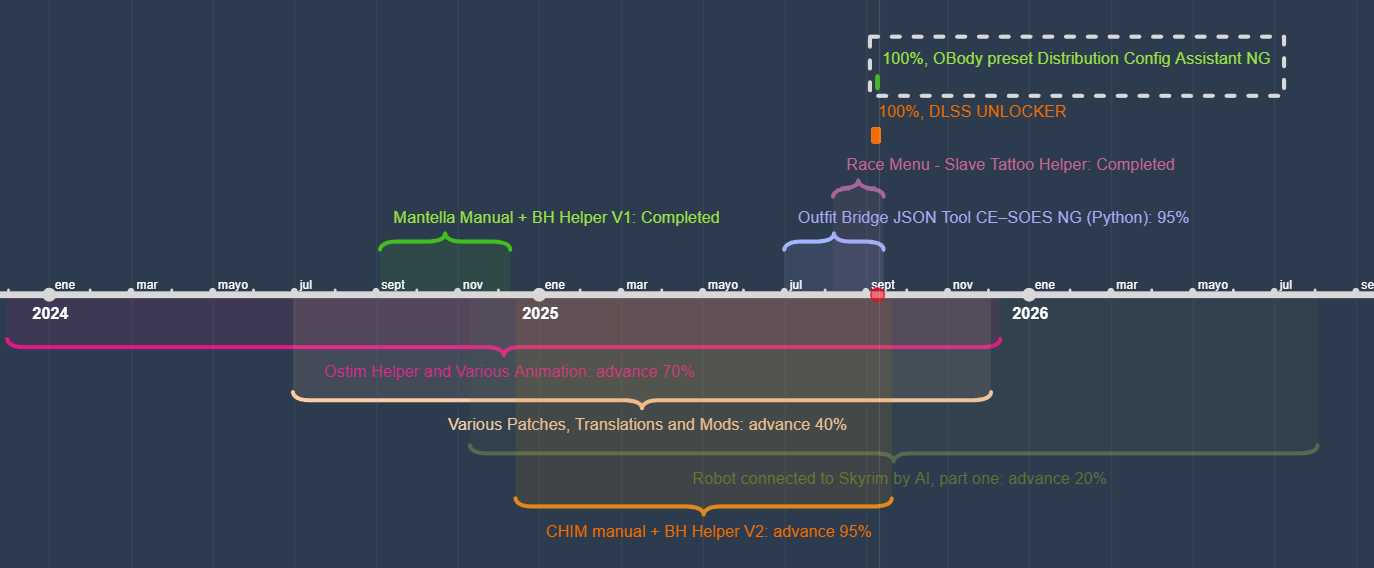
This is the progress of several projects I'm working on this year. I'll be uploading them as they are concluded, thanks to everyone who supports me with comments,
thanks for being so patient 😿
Final Note
This project is open source MIT and available to the community. Contributions, bug reports, and suggestions are always welcome. Together we can make Skyrim a more welcoming and comfortable place.